
Introduction
In today’s digital world, screens have become a part of everyday life. Whether you’re working on a computer, attending online classes, watching videos, or scrolling through social media, your eyes spend hours focusing on digital devices. While technology makes life easier, excessive screen time can lead to a common problem known as digital eye strain, also called Computer Vision Syndrome (CVS).
Digital eye strain can cause symptoms such as tired eyes, headaches, blurred vision, dry eyes, neck pain, and difficulty focusing. The good news is that these issues are usually temporary and can be prevented with simple daily habits.
In this guide, you’ll learn what digital eye strain is, why it happens, and 15 practical, expert-backed tips to keep your eyes comfortable and healthy during long hours of screen use.
Quick Answer
Digital eye strain occurs when your eyes become tired after prolonged use of computers, smartphones, tablets, or other digital screens. Following the 20-20-20 rule, adjusting screen brightness, maintaining proper posture, blinking regularly, using computer glasses, and taking frequent breaks are some of the most effective ways to reduce eye strain and improve visual comfort.
Table of Contents
- What Is Digital Eye Strain?
- Common Symptoms
- What Causes Digital Eye Strain?
- Who Is Most at Risk?
- 15 Effective Tips to Reduce Digital Eye Strain
- Why the 20-20-20 Rule Works
- Do Blue Light Glasses Really Help?
- Best Foods for Healthy Eyes
- When Should You Visit an Eye Doctor?
- Frequently Asked Questions
- Final Thoughts
What Is Digital Eye Strain?
Digital eye strain refers to a group of eye and vision-related problems caused by prolonged use of digital devices. Unlike reading printed text, digital screens require your eyes to work harder because of glare, flickering, lower contrast, and constant focusing.
The longer you stare at a screen without taking breaks, the more likely you are to experience discomfort. Although digital eye strain usually doesn’t cause permanent vision damage, it can significantly affect productivity, concentration, and overall comfort.
Common Symptoms of Digital Eye Strain
You may be experiencing digital eye strain if you notice one or more of these symptoms:
- Dry or watery eyes
- Blurred vision
- Headaches after screen use
- Eye fatigue
- Burning or itching eyes
- Difficulty focusing
- Increased sensitivity to light
- Neck and shoulder pain
- Double vision in some cases
Many of these symptoms improve after resting your eyes, but if they occur frequently, it’s important to adopt healthier screen habits.
What Causes Digital Eye Strain?
Digital eye strain isn’t caused by just one factor. Instead, it’s usually the result of several habits and environmental conditions that force your eyes to work harder than they should.
Here are the most common causes:
Prolonged Screen Time
Spending several hours continuously looking at a computer, laptop, tablet, or smartphone keeps your eye muscles constantly focused at one distance. Unlike reading a book, digital screens often contain moving content, changing brightness, and varying text sizes, making your eyes work even harder.
Reduced Blinking
People naturally blink around 15–20 times per minute. However, when using digital devices, the blink rate can drop significantly. Fewer blinks mean your eyes dry out faster, leading to irritation, redness, and discomfort.
Screen Glare
Reflections from windows, overhead lights, or glossy displays make it difficult for your eyes to focus. Glare forces your eyes to constantly adjust, increasing fatigue over time.
Poor Lighting
Using screens in rooms that are either too bright or too dark creates an imbalance between your screen and the surrounding environment. This makes your eyes work harder to adapt.
Incorrect Viewing Distance
Holding your screen too close—or placing your monitor too far away—causes unnecessary focusing effort.
A comfortable viewing distance for most computer users is about 20 to 28 inches (50–70 cm).
Poor Posture
Slouching, leaning toward the monitor, or constantly looking down at your phone doesn’t just affect your neck and back—it also changes the angle at which your eyes view the screen, increasing strain.
Uncorrected Vision Problems
Even a small, uncorrected vision issue can become noticeable after long hours of screen use. If you frequently experience headaches or blurred vision, a comprehensive eye examination is recommended.
Who Is Most at Risk?
Anyone who spends a significant amount of time using digital devices can experience digital eye strain. However, some groups are more likely to notice symptoms.
Office Professionals
Employees who work on computers throughout the day often experience eye fatigue, headaches, and neck discomfort due to extended screen exposure.
Students
Online classes, digital assignments, and long study sessions mean many students spend several hours each day looking at laptops or tablets.
Software Developers
Developers frequently focus on detailed code for extended periods, making regular breaks and proper workstation setup especially important.
Graphic Designers & Video Editors
Creative professionals often work with high-resolution displays for many consecutive hours, requiring sustained visual attention.
Gamers
Long gaming sessions combined with intense concentration can reduce blinking frequency and contribute to eye fatigue.
Remote Workers
Work-from-home setups sometimes lack proper lighting or ergonomic workstations, increasing the likelihood of digital eye strain.
15 Effective Tips to Reduce Digital Eye Strain
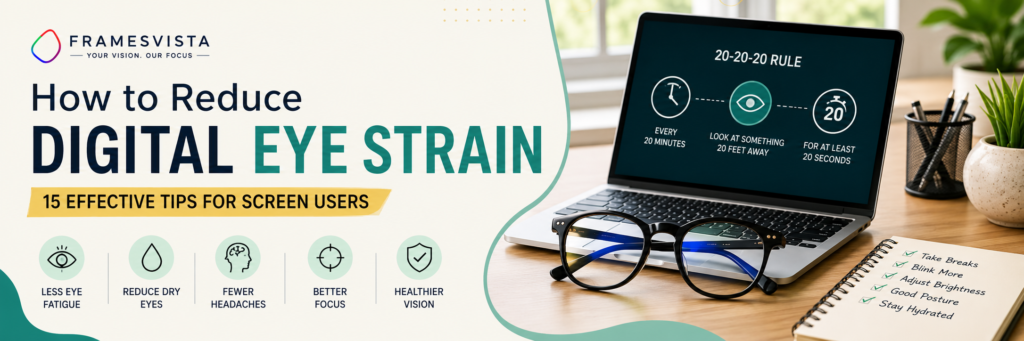
1. Follow the 20-20-20 Rule
One of the easiest and most effective ways to reduce eye strain is the 20-20-20 Rule.
Every 20 minutes, look at something about 20 feet away for at least 20 seconds.
This simple habit allows your eye muscles to relax and helps reduce focusing fatigue during long work sessions.
2. Blink More Frequently
Blinking keeps the surface of your eyes moist and comfortable.
During screen use, many people blink less often without realizing it.
Make a conscious effort to blink normally, especially during long periods of concentration.
3. Adjust Your Screen Brightness
Your monitor shouldn’t be much brighter or darker than the surrounding room.
A balanced brightness level helps reduce unnecessary eye effort and makes reading more comfortable.
4. Position Your Monitor Correctly
For most users, the ideal setup is:
- About an arm’s length away
- Top of the screen slightly below eye level
- Directly in front of you
This helps reduce both eye strain and neck discomfort.
5. Reduce Screen Glare
Glare from windows or overhead lighting can make digital content harder to read.
To reduce glare:
- Close curtains if sunlight hits the screen.
- Position the monitor away from direct light sources.
- Consider using an anti-glare screen if necessary.
6. Increase Text Size
If you constantly lean forward or squint while reading, increase the text size instead of forcing your eyes to work harder.
Larger text improves readability and reduces visual fatigue.
7. Keep Your Screen Clean
Fingerprints, dust, and smudges reduce screen clarity and increase reflections.
Wipe your screen regularly using a soft microfiber cloth designed for electronics.
8. Use Computer Glasses When Needed
If you spend several hours each day using digital devices, computer glasses with an anti-reflective coating may improve visual comfort by reducing glare and making extended screen use more comfortable.
They work best when combined with healthy screen habits—not as a replacement for regular breaks or proper workstation ergonomics.
9. Take Regular Screen Breaks
Even if you’re deeply focused on work, your eyes need occasional rest. Sitting in front of a screen for hours without a break increases muscle fatigue and reduces blinking.
Try to stand up, stretch, and walk around for a few minutes every hour. These short breaks benefit not only your eyes but also your neck, shoulders, and back.
10. Maintain Proper Room Lighting
The lighting in your workspace plays an important role in visual comfort.
A room that is too dark forces your eyes to adjust constantly to the bright screen, while excessive lighting creates unwanted reflections.
For the best experience:
- Use soft, even lighting.
- Avoid direct sunlight on your monitor.
- Position desk lamps so they don’t reflect off the screen.
A balanced lighting setup helps reduce visual fatigue throughout the day.
11. Stay Hydrated
Your eyes rely on a healthy tear film to stay comfortable. Dehydration can contribute to dryness and irritation, especially in air-conditioned environments.
Drink enough water throughout the day and maintain a healthy indoor humidity level whenever possible.
12. Adjust Screen Settings
Small changes to your display settings can make a noticeable difference.
Consider adjusting:
- Brightness
- Contrast
- Text size
- Color temperature
- Display scaling
Most modern devices also offer Night Mode or Eye Comfort Mode, which reduces blue light emission during evening hours.
13. Use Artificial Tears if Recommended
If you frequently experience dry eyes, preservative-free lubricating eye drops may provide temporary relief.
However, persistent dryness should always be discussed with an eye care professional rather than relying on self-treatment.
14. Get Regular Eye Examinations
Many people assume their screen discomfort is caused only by digital devices, when an uncorrected vision problem may also be contributing.
Routine eye examinations help detect changes in vision early and ensure your prescription remains accurate.
Adults who spend long hours using digital devices should have regular comprehensive eye exams as recommended by their eye care professional.
15. Create an Ergonomic Workspace
A well-designed workspace benefits both your eyes and your posture.
An ideal workstation should include:
- Monitor positioned about an arm’s length away.
- Screen slightly below eye level.
- Comfortable chair with back support.
- Feet resting flat on the floor.
- Keyboard and mouse positioned comfortably.
Good ergonomics reduce overall fatigue and support long-term comfort during extended computer use.
Do Blue Light Glasses Really Help?
Blue light glasses have become increasingly popular, but many people wonder whether they truly make a difference.
Current research suggests that while blue light from digital devices is not proven to permanently damage healthy eyes, some users report improved visual comfort when using blue light filtering lenses—particularly during long screen sessions or evening use.
The greatest benefits often come from combining quality eyewear with healthy screen habits such as:
- Taking regular breaks
- Following the 20-20-20 rule
- Reducing glare
- Maintaining proper posture
- Adjusting screen brightness
Think of blue light glasses as one helpful tool rather than a complete solution.
Best Foods for Healthy Eyes
Good nutrition plays an important role in maintaining healthy vision.
Include these foods regularly in your diet:
Leafy Green Vegetables
Spinach, kale, and other leafy greens contain lutein and zeaxanthin, nutrients that support eye health.
Carrots
Rich in beta-carotene, carrots contribute to normal vision and overall eye function.
Citrus Fruits
Oranges, lemons, and other citrus fruits provide vitamin C, an important antioxidant for eye health.
Fatty Fish
Salmon, sardines, and mackerel are excellent sources of omega-3 fatty acids, which support healthy tear production.
Eggs
Egg yolks contain lutein, zeaxanthin, and zinc, all of which contribute to healthy vision.
Nuts and Seeds
Almonds, walnuts, sunflower seeds, and flaxseeds provide vitamin E and healthy fats that support eye wellness.
When Should You Visit an Eye Doctor?
Occasional eye strain after long screen sessions is common. However, you should schedule a professional eye examination if you experience:
- Frequent headaches
- Persistent blurred vision
- Double vision
- Severe eye pain
- Sudden vision changes
- Continuous dryness despite taking breaks
- Difficulty focusing even after resting
Early diagnosis helps identify underlying vision problems before they become more serious.
Frequently Asked Questions
Can digital eye strain permanently damage my eyes?
Current evidence suggests that digital eye strain itself does not permanently damage healthy eyes. However, it can significantly affect comfort and productivity if left unmanaged.
How many hours of screen time are too much?
There is no universal limit. The key is to take regular breaks, maintain proper posture, and follow healthy screen habits throughout the day.
Is Night Mode enough to protect my eyes?
Night Mode may improve viewing comfort, especially in low-light environments, but it should be combined with good lighting, regular breaks, and appropriate screen settings.
Are computer glasses worth buying?
For people who spend several hours each day using digital devices, computer glasses with anti-reflective coatings can improve comfort and reduce glare during prolonged screen use.
Can children develop digital eye strain?
Yes. Children who spend extended periods using tablets, smartphones, or computers may also experience digital eye strain. Encouraging regular breaks and outdoor activities can help support healthy visual habits.
Final Thoughts
Digital screens have become an essential part of modern life, but they don’t have to come at the expense of your eye comfort.
Simple daily habits—such as taking regular breaks, following the 20-20-20 rule, maintaining proper lighting, blinking more often, and creating an ergonomic workspace—can significantly reduce digital eye strain.
If you spend several hours each day using computers, laptops, or smartphones, investing in healthy screen habits today can help keep your eyes more comfortable for years to come.
Remember, if your symptoms persist or worsen despite making these changes, consult a qualified eye care professional for a comprehensive eye examination.